Creative Work
Eight projects built in Snap!, spanning generative geometry, pixel manipulation, sound design, interactive drawing, game development, data visualization, web building, and a final piece that treats code as an artistic medium in its own right.
Code as a creative medium.
Snap!, a visual block-based programming language, was the medium here, but the question driving each project was never about the tool. It was about computing as a way of making things: image, sound, interaction, data, the web. Each assignment introduced a different creative domain and asked for something original within it.
The projects span from early geometry experiments to a final piece that engaged directly with artworks from the University of Michigan Museum of Art. What stayed consistent across all of them was the same question: what can code do that other media cannot?
A collage that only exists through interaction.
The final project was an interactive digital collage inspired by two works from the UMMA: Flirt (1979) by Robert Rauschenberg and What We All Lack (1962) by Man Ray. Both pieces treat images as flexible rather than fixed, Rauschenberg layers images so meaning comes from how they interact, while Man Ray's work feels open-ended and deliberately incomplete.
Fragmented Self
Image fragments appear when the user makes sound into the microphone, and slowly fade away when the interaction stops. This creates a continuous cycle where the collage is always building and dissolving at the same time, reflecting the temporary and unstable nature of meaning in the original works.
The fragments used are photographs of the artist herself. Since the collage is constantly forming and dissolving, using personal images adds another layer of meaning: different versions of the same person appear, overlap, and disappear. Identity, like the collage, is not fixed but made up of fragments that shift depending on context and interaction.
Three keyboard modes let the viewer shift between different visual and emotional interpretations of the same system.
Mode 1, Warm
Saturated reds and pinks inspired by Flirt. Fragments feel dense and close, creating intensity through overlap and layering.
Mode 2, Subdued
A softer, more muted palette. Tones are cohesive rather than contrasting, making the collage feel dream-like and unified.
Mode 3, Natural
More varied and dynamic. Reflects how images online are constantly remixed, layered, and reinterpreted without a fixed meaning.
"In my project, there is no single final version of the collage. Each interaction produces a different result, and the image only exists for a short period of time before fading away."
, Final project write-upWorking with code as a medium changed how the idea of collage could be expressed. In a physical collage, once assembled, the piece becomes fixed. Code allows the artwork to exist as a system that is constantly running and changing, unpredictability comes not from physical materials but from user input and controlled randomness within the system. The viewer is not just observing something complete. They are necessary for the work to exist at all.
Geometry, pixels, and pattern.
Two of the earliest assignments produced the most visually striking outputs. The first used recursive loops and color cycling to tile a canvas with geometric patterns. The second applied custom pixel-level image filters to personal photographs and assembled them into a designed collage.
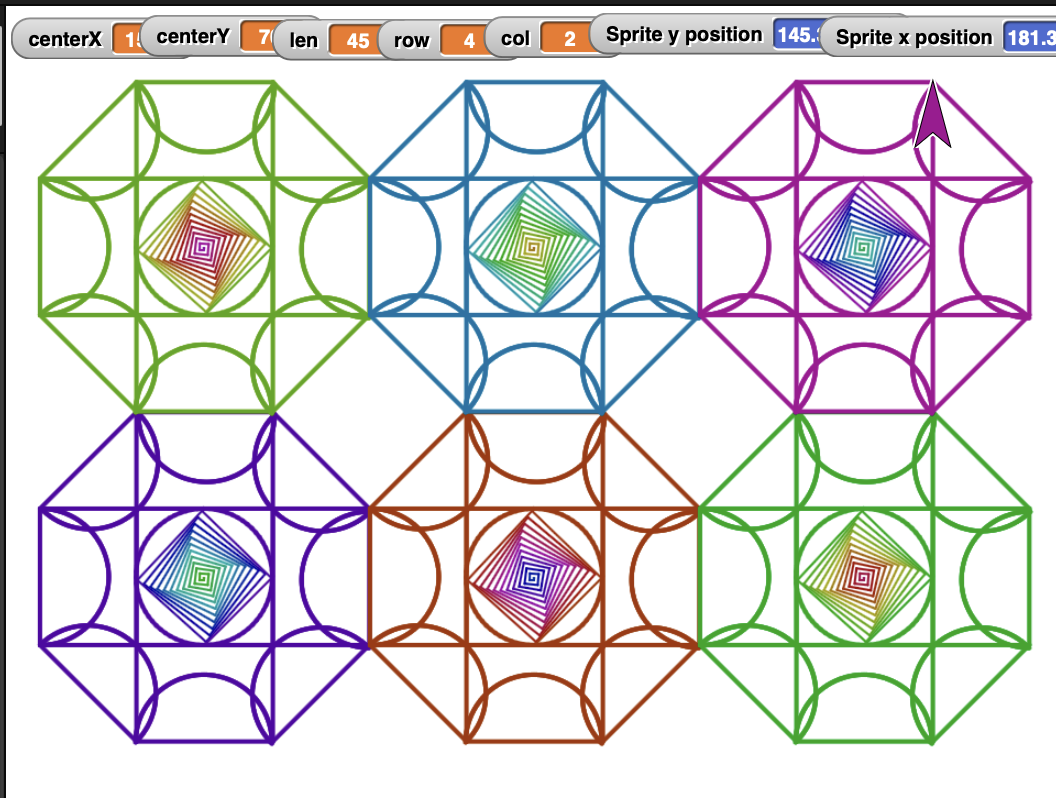
Assignment 01, Geometric tiling with recursive loops and color cycling
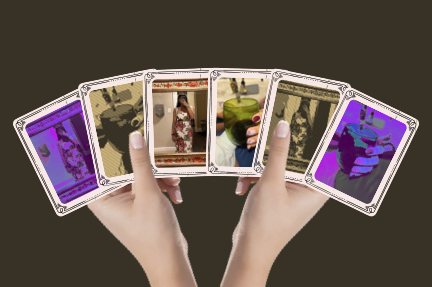
Assignment 02, Image collage with custom pixel-level filters
The geometric tiling used variables for center position, tile size, row, and column to place each unit precisely, then looped through a color sequence to distinguish the six tiles. The image collage used custom filter blocks that manipulated individual red, green, and blue channel values to transform the same photographs into visually distinct versions of themselves.
Eight assignments, eight mediums.
Each project introduced a different domain and a different set of creative constraints. Click any card to open the live project in Snap!
Geometric Tiling
Recursive loops draw overlapping squares, circles, and rotating diamonds across a tiled canvas, cycling through six colors. Each unit is precisely placed using centerX, centerY, and size variables. The center of each tile creates an intricate rose-like pattern that shifts between geometric and organic as it radiates outward.
Open in Snap! Assignment 02Image Collage
Custom pixel-level image filters manipulate individual RGB channel values to transform personal photographs. Two original images each appear three times: once original, twice filtered. The final collage arranges the images fanned out like playing cards held in a hand, with the filters creating contrast between the familiar and the abstract.
Open in Snap! Assignment 03Before a Night Out
A soundscape capturing the chaos of getting ready with roommates before going out, makeup compacts, heels on the floor, phone notifications, lip gloss, perfume sprays, background music, and camera clicks. Sounds are clipped, spliced, resampled, and layered in parallel to recreate the overlapping energy of the moment.
Open in Snap! Assignment 04Fireworks Festival
A fireworks show driven by your microphone, put on your favourite song and watch. Lower frequencies launch fireworks near the ground, higher frequencies send them skyward, and louder sounds create bigger explosions with more particles. Keyboard controls switch between colorful, Michigan-themed (blue and gold), and rainbow modes.
Open in Snap!Late for Class at Michigan
A side-scrolling game where a student sprints across the Michigan campus trying to make it to lecture on time. Jump over obstacles, collect coffee and notes for points, and race against the clock as the game gets progressively harder. Built with costume-switching sprites, animated campus backgrounds, and a scoring system with a victory screen.
Data Art
A constellation-style visualization built from a coffee dataset, where each coffee variety is rendered as a cluster of circles. Size, color, and position are each driven by different flavor values from the data, and faint lines connect related entries. The result reads less like a chart and more like a star map made of flavor.
Open in Snap! Assignment 07Web Page in Snap!
A fully designed web page built entirely through Snap! blocks, with no hand-written HTML anywhere. Custom blocks generate valid HTML with inputs, apply a CSS color scheme, and embed another Snap project. The page has headings, images, external links, and five distinct CSS rules, all assembled programmatically.
Open in Snap!Fragmented Self
An interactive digital collage that forms and dissolves through microphone input. Image fragments of the artist appear when sound is detected and fade when it stops. Three keyboard modes shift the palette and emotional register of the piece, inspired by Rauschenberg and Man Ray.